
chatwire
Open-source iMessage bridge for macOS. Access your messages from any device — your phone, your laptop, your browser. One command to install, zero servers to manage.
Features
What chatwire does
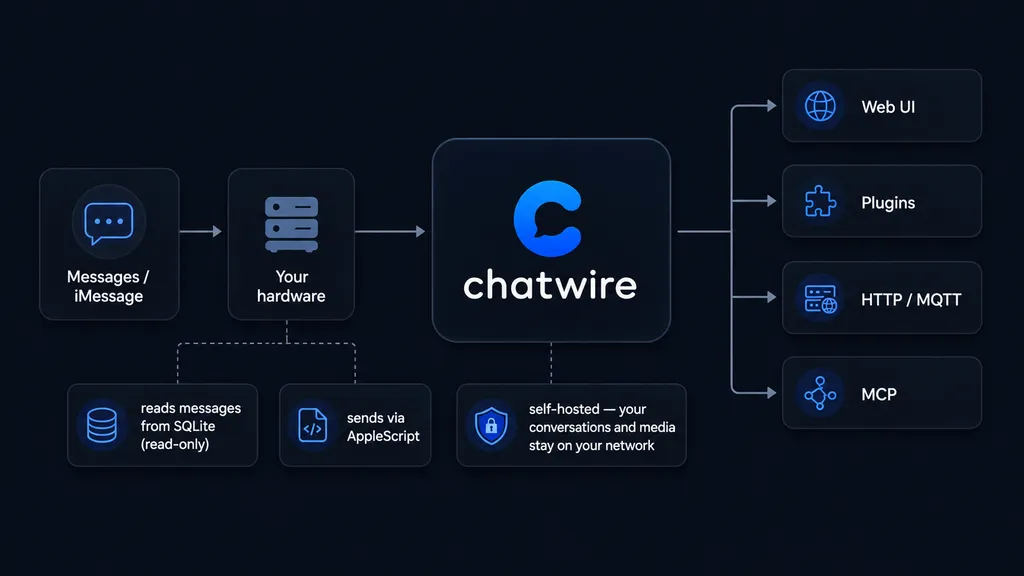
A bridge between your Mac's Messages app and everything else. No cloud, no accounts, no servers to rent.
Web UI
A full React interface for reading and sending iMessages. 23 themes, full-text search, attachments, group chats, tapback reactions, and read receipts. Installable as a PWA.
Telegram relay
Reply to your iMessages from Telegram. Full two-way bridge with contact names, group support, and delivery confirmation.
Plugin system
Extend with ntfy push notifications, MQTT, Home Assistant, XMPP, and more. Every plugin gets an auto-generated settings section. Or build your own — the SDK is open.
Automation rules
A condition/action rules engine fires on every message. Write rules in a human-readable DSL: from:Alice AND contains:urgent. Actions include webhook, suppress, log, and auto-reply.
MCP integration
Connect AI agents to your messages. 10 tools, 4 permission scopes, and a confirmation flow that keeps you in control. Claude, ChatGPT, and local LLMs supported.
Zero telemetry
No analytics. No crash reporting. No "anonymized usage data." Your messages stay on your Mac. We don't know how many users we have, and we're fine with that.
How it works
Step 1: Install on your Mac
Run pipx install chatwire. The setup wizard walks you through granting Full Disk Access and Automation permissions — two macOS prompts, nothing more. Runs on macOS 12 Monterey and up.
Step 2: Your Mac reads chat.db
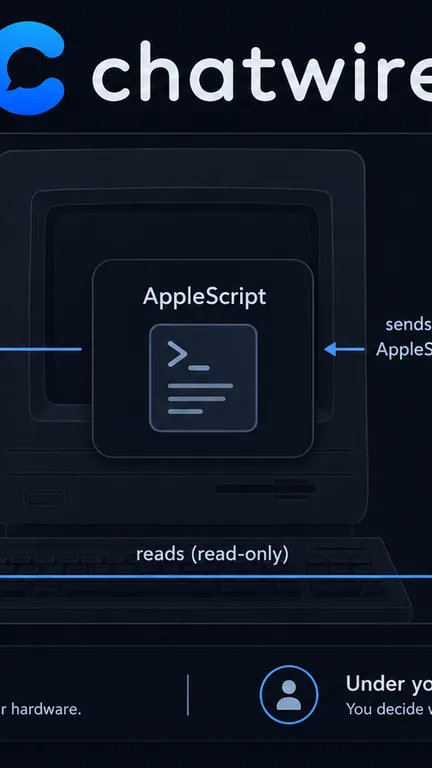
chatwire watches ~/Library/Messages/chat.db with your explicit permission. It resolves senders against Contacts.app and drives Messages.app via AppleScript to send on your behalf. No protocol reverse-engineering.
Step 3: Access from anywhere
Browser, phone, Telegram, AI agent — connect from any device. Your messages never touch our servers, because we don't have any. Local network, Tailscale, or Cloudflare Access — you control the perimeter.
Done!
Comparison
How chatwire compares
Free. Self-hosted. Open source.
Zero telemetry, zero accounts, zero subscriptions. If we disappear tomorrow, your instance keeps running.vs BlueBubbles
BlueBubbles requires Firebase + Google Cloud setup. chatwire is one command.
vs AirMessage
AirMessage is partially open source with a basic web UI. chatwire is fully open with 23 themes and a plugin system.
vs Beeper
Beeper routes through their servers at $10/month. chatwire is free, self-hosted, and your messages never leave your Mac.
Install
Three ways to install
chatwire install-agents, then chatwire setup. Run chatwire doctor to verify.pipx (recommended)
Isolated environment, clean upgrades. pipx install chatwire && chatwire setup
Homebrew
brew install allenbina/tap/chatwire — convenient if you already use brew.
curl (no package manager)
curl -fsSL https://raw.githubusercontent.com/allenbina/chatwire/main/scripts/install.sh | bash
Values
What we chose, and what we didn't
Bridges to open platforms
We connect to Telegram (open API), Matrix (open protocol), and XMPP (open standard). We don't connect to platforms that prohibit third-party access in their ToS.
Self-hosted means self-owned
Your chatwire instance runs on your Mac. Your messages never touch our servers — because we don't have servers. There's no cloud component, no account, no subscription.
Plugins are a choice, not a mandate
The core app works with zero plugins installed. The plugin system exists so you can extend chatwire how you want. Not so we can upsell you.
No tagline
There's no tagline. It's just an open tool. It's MIT licensed, so you can repackage it and give it whatever tagline you want.
FAQ
Frequently asked questions
Do I need a Mac running 24/7?
Yes — chatwire reads chat.db and drives Messages.app, both of which require a running Mac. A Mac mini or any always-on Mac works. When your Mac sleeps, the bridge pauses and resumes when it wakes.
Is this safe? Will Apple ban my account?
chatwire reads a local SQLite database and sends messages via AppleScript — the same mechanism macOS Shortcuts uses. There's no protocol reverse-engineering, no jailbreaking, no Apple gray area.
Can I use it from my Android phone?
Yes. The web UI is a PWA — install it to your home screen from any browser. Or use the Telegram relay to get iMessages in Telegram. A React Native app is also in development.
What happens to my messages if chatwire goes away?
Nothing. Your messages are in Apple's Messages app and chat.db — chatwire only reads them. If you uninstall chatwire, everything is exactly where it was.
Is there a hosted version?
No, and there won't be. Hosting means routing your messages through someone else's servers. That's the opposite of what chatwire is for.
How do I expose it outside my home network?
Tailscale (easiest), Cloudflare Access, or a reverse proxy with authentication. chatwire has built-in password auth and API key scoping. See the docs for setup guides.
pipx install chatwire
MIT licensed. Free forever.